Working of Docker
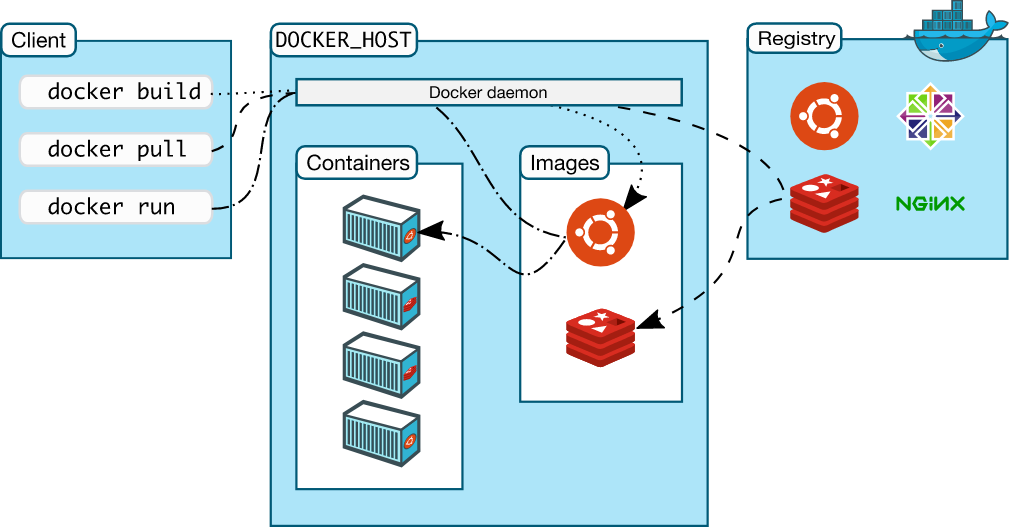
Credits to LiveOverflow Youtube How Docker Works - Intro to Namespaces
Key Concepts
What Are Namespaces?
- A namespace is a "private space" in Linux.
- Docker uses namespaces to isolate environments for each container.
- This isolation makes containers feel like separate machines, but they are not full virtual machines (VMs).
When You Run a Docker Container
-
Docker creates a set of namespaces for isolation:
pid: isolates processesnet: isolates network interfacesmnt(mount): isolates filesystem mount points
Real Example
- Inside container: user is
www-datawith UID 1000 - On host: user is
userwith same UID 1000 - Same UID, different usernames due to
/etc/passwdfiles in different environments
Processes View
- Inside container: fewer visible processes (isolated view)
- On host: all processes visible including container ones
- Same process has different PIDs inside vs outside container (e.g.,
watch)
Who Spawns Container Processes
systemd: starts Linux systemdockerd: Docker daemon started by systemdcontainerd: manages container lifecyclerunc: spawns actual container processes
What is runc
- A CLI tool that follows OCI specs
- Directly responsible for setting up namespaces using Linux syscalls
Behind The Scenes: Using strace
- Use
strace -f -p <pid>to trace syscalls made bycontainerd - Observe the creation and management of namespaces
Key Syscall: unshare()
- Used to isolate parts of a process environment
- Example:
CLONE_NEWPIDisolates process ID namespace - First child becomes PID 1 inside the container
Process ID Flow
- runc calls
unshare() - Then uses
clone()to create new PID namespace - New process gets PID 1 inside container
- Host sees different PID (e.g., 29866), container sees PID 1
Mount and Network Namespaces
CLONE_NEWNS: isolates mount points (filesystem)CLONE_NEWNET: isolates network stack
Checking Namespaces
Use an actual PID, for example:
readlink -f /proc/1234/ns/*
- Here
1234is the PID of the process you want to inspect. - Shows all namespace identifiers for a given process.
- Compare host and container processes (each with their own real PID) to confirm isolation.
User Namespace
CLONE_NEWUSERallows UID/GID remapping- A process can be root (UID 0) inside but remain unprivileged outside
- In this example, UID mapping was not used, so 1000 was same inside and outside
Lab:
- To prove that Docker uses Linux namespaces to isolate containers and to show how a container shares the same kernel with the host but operates in a separate environment.
Step 1: Fix the Docker permission error (lab only)
- This lets your current user talk to the Docker daemon without using
sudofor every command.
sudo chmod 666 /var/run/docker.sock
Not recommended for production, but fine for this lab.
Step 2: Start a container with a background sleep process
- Run a minimal Alpine container named
test-nsthat just sleeps in the background.
echo "[+] Starting test container..."
docker run -dit --name test-ns alpine sleep 10000
Step 3: Install procps and start a background watch process inside the container
- Install tools like
psinside the container and start awatch 'ps aux'process so we have a long‑lived process to inspect.
echo "[+] Installing procps and starting 'watch' in background inside container..."
docker exec test-ns sh -c "export TERM=xterm && apk add procps && watch 'ps aux' > /dev/null &"
Step 4: Get the PID of watch inside the container
- Show the PID of the
watchprocess as seen from inside the container’s PID namespace.
echo "[+] Getting PID of 'watch' inside the container:"
docker exec test-ns pgrep watch
- Note the PID value you see here (for example,
13). - This PID is inside the container and is not the same as any host/dev‑container PID.
Step 5: Show namespaces of your current shell (dev environment)
- Check which namespaces your current shell belongs to (in Codespaces this is your dev container).
echo "[+] Showing namespace IDs of current shell (your dev environment):"
readlink -f /proc/$$/ns/*
- You will see lines like:
/proc/1234/ns/mnt:[4026532223]
/proc/1234/ns/pid:[4026532226]
/proc/1234/ns/net:[4026531840]
...
- Each
[number]is the namespace ID for that resource (mnt, pid, net, etc.).
Step 6: Show namespaces of PID 1 inside the test-ns container
- Now check the namespaces of the init process (
PID 1) inside the container.
echo "[+] Showing namespace IDs of PID 1 inside the 'test-ns' container:"
docker exec test-ns sh -c "ls -l /proc/1/ns"
- You will see similar output, for example:
lrwxrwxrwx 1 root root 0 ... mnt -> mnt:[4026532394]
lrwxrwxrwx 1 root root 0 ... pid -> pid:[4026532397]
lrwxrwxrwx 1 root root 0 ... net -> net:[4026532399]
...
Step 7: Compare both outputs
-
Compare the namespace IDs from:
- Step 5 (your current shell / dev environment), and
- Step 6 (PID 1 inside
test-ns).
-
If
mntIDs differ → different mount namespaces. -
If
pidIDs differ → different PID namespaces. -
If
netIDs differ → different network namespaces. -
Some namespaces (like
timeoruser) might be shared depending on the platform and Docker configuration.
You’ll see different namespace IDs for at least some namespaces → this proves containers are isolated using namespaces, even though they share the same underlying Linux kernel.